Showing posts with label PC Tricks. Show all posts

Wednesday, 4 December 2013

Clean your RAM without any software


Clean your RAM without any software

RAM decides the speed of your computer, there are many software available in internet to keep your RAM free, but how much of these software supports to keep your RAM Free?
And now I am going to show you something very easy to keep your RAM free. It’s all few lines of code which can be used with notepad.

How to Hide any Local Drive using Command prompt


How to Hide any Local Drive using Command prompt

Today Computer World tutorial is about how to hide a local drive without any 3rd party software. There are lots of free and payable software's available to hide local drive, but I'm not gonna talk about hide a local drive using a software. In this tutorial I'll show you an easiest way to hide local drive without using software. This will save your both money and time.

How to make Windows 7 Genuine using Command Prompt


How to make Windows 7 Genuine using Command Prompt

How many of you using Genuine windows 7 ?
we all know that everyone can't buy a genuine windows 7, because cost is too high.
Lots of Windows 7 users have experienced the error message that "Windows 7 is not genuine". 
This error message comes if you use pirated or OEM versions of Windows 7.

How to Recover Hidden Files From Virus Infected USB Pendrive without any Software


How to Recover Hidden Files From Virus Infected USB Pendrive without any Software

We are using USB pen drives for data transfer between computers. It's very important to keep your data always with you. When you're using pen drives, the biggest problem is Viruses. Mostly pen drives doesn't consist any security measures. So viruses and malwares can attack our pen drive easily. If virus attacks your pen drive, it hides the all the files and creates .exe 
extension to replace the hidden files.

Sunday, 22 September 2013

How To Install Windows XP With USB Drive

This tutorial will explain how to install windows xp with usb drive.
Screenshots provided to make make bootable usb and copy windows xp installer.


How To Install Windows XP With USB Drive


If you are thinking to install xp from usb boot. Then you are at right place. 
I’ll show step by step how to boot windows xp from usb. Installing windows xp with usb is very simple. All screenshots are given to show you how to install windows xp. 
You’ll only need windows XP iso aur windows XP CD. 
Secondly a usb drive of atleast 1 GB is required for windows xp on usb.

How To install Windows XP From USB 

’ll need WinToFlash tool to make bootable USB and install windows xp from usb.


Easy Steps to Install Windows XP With USB Drive

Open WinToFlash software this will help you to install windows XP.

 
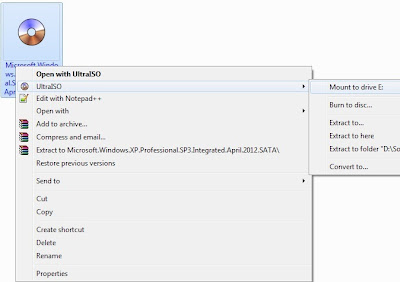
Once the software is opened Follow below screenshot. If you have windows XP ISO 
then mount image to Virtual drive using ultraISO. If ultraiso is not installed then you 
can download ultraiso from here. Otherwise if you have Windows XP CD then insert into 
your CD rom.
 
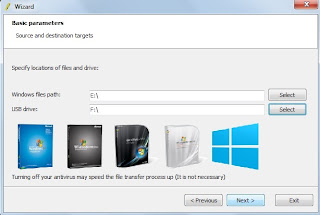
The WinToFlash supports both CD and ISO File to be read as disk image and copy that to drive letter. The procedure is mentioned in below screenshot.
 
For example in my case Drive E contains Windows XP ISO image mounted. whereas F 
drive is my usb. Then Click Next button and your USB pen drive will be formatted. This 
tool will make usb bootable and will install windows XP on usb drive. Once the 
process is 100% then you can reboot computer and boot XP from USB.If you hit any errors during installation of XP via USB then please comment here. 
This tool also supports installation of Windows 8 and Windows 7. However you can also find complete tutorial to  Windows 7 from USB.

Download Youtube Videos with IDM Using Proxy

If youtube is blocked in any country then you can still download youtube videos. In this tutorial I’ll share the steps to download youtube videos.


Download Youtube Videos with IDM Using Proxy


How to Download Youtube Videos

Now when Youtube is blocked in some countries. People often use proxy tools (Ultrasurf, Hotspot sheild or hide ip). Then many people are facing issues while download from youtube by IDM. Because IDM needs to be configured to download youtube videos when on proxy.

Youtube Downloader Steps
if you haven’t install IDM then first you need to install it. You can download IDM from this link.
If you are not already using any proxy then I suggest you to Install Ultrasurf.
Make sure IDM is registered. You can follow steps in read me document of its folder.
Run Ultrasurf and wait until it is connected.
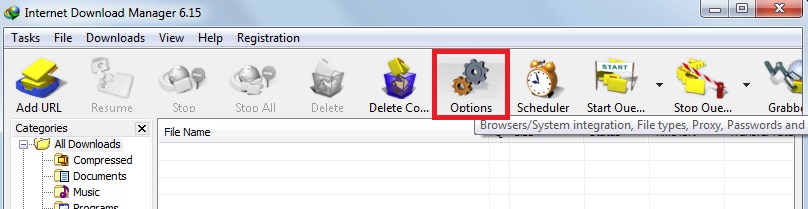
Open IDM and go to Option button.


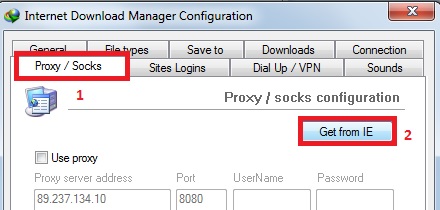
Click the “Proxy/Socks” Tab and hit button “Get From IE”


Then press OK and Close the options.
Now Open Youtube in browser.
You’ll see IDM link on corner of youtube video. 
Click it and youtube video downloading will begin successfully.
If you hit any issues while downloading video from youtube let me know.


Windows 7 USB Installation

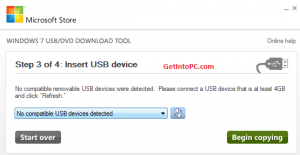
This tutorial is about Windows 7 USB Installation. Below are steps with screenshot. No CD is required. All you need is a usb flash drive of atleast 4GB and Windows 7 iso file.


Windows 7 USB Installation


First of all Download this program. This is Microsoft genuine tool to make usb drive bootable


After you have downloaded above Windows 7 USB tool. Now follow below steps.
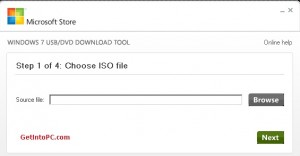
Open this tool from your programs.


Windows 7 USB Installation


Then Click on Browse button and go to path where your windows iso file is located.


Windows 7 USB Installation


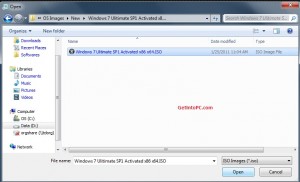
Click on WIndows 7 iso file and click on Open button.


Windows 7 USB Installation


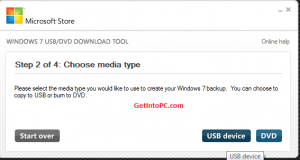
Now from options click on USB Device.


Windows 7 USB Installation


From Drop Down box select your USB Pen drive letter e.g. H: or I: or G: and then click Begin copying. After the process is completed the USB is now bootable.
Turn off your computer and plugin USB. Now Turn on PC and boot from USB. Done.


Speedup Youtube Videos Buffering 3 Times Faster

We all love YouTube as it gives us the power to learn, listen our favorite music and some times pass time by watching funny videos. YouTube is the world’s no.1 online videos sharing website with over million new videos uploaded daily.

How to Make an Application Portable


Ever wanted to use your programs on the go? Not want to install your favorite programs on other computers. Try this little moderately simple trick to use your favorite programs easily from your flash drive, mp3 player, or external hard drive.

Convert Windows XP SP2 into SP3 without any setup program: Simple trick

These days the technology is changing very rapidly and with in a short span of time we have to update with the new patches ans supplement for several software, though these are always in the favor of the end user but most of the time we just don’t want to implement these latest changes. 

Use your USB flash drive as virtual RAM

Today I´m gonna show you how to use a USB thumb drive as a virtual RAM device for your PC.
The thumb drive I'm using is a 4 GB from Kingston. The size should be less than 4 GB.
Follow the screenshots below to go through theSteps.

How to Change Windows 7 Logon Screen


There are many ways through which you can change Windows 7 Logon screen and insert your own picture or wallpaper of your choice. One of the best free software to change windows 7 Logon screen is Stardocks Logon Studio. 

Change Windows 7 System Properties Logo


Ever wanted to change the default windows logo in windows 7 system properties with your own custom one or with Apple’s logo. Its human nature that with time he tends to get bore with old things and same is happen with Windows users. Every day you see same windows interface with same folder icons, Windows themes, Wallpapers and default windows icons. But not many people think like that. 

Enable Desktop Wallpapers and Themes in Windows 7 Starter and Home Basic


It amazing that you can change wallpaper in Windows 3.1(First ever edition of windows) but not inWindows 7 Starter and Windows 7 Home Basic editions. Microsoft says that they have disable these features in order to make these versions perform better and require less resources. 

Force Windows to Shutdown in Less than 10 Seconds


When you first install windows on your computer you notice that windows boot and shutdown in less than 10 seconds. But after some time and after installing different software’s and antiviruses it began to slow down and some time it takes more than a minute to boot or shut down. 

Send and Receive Large Files By Creating A Free Direct Connection Link

There are lots of ways on internet to share files with your friends, family and even the rest of world. In these typical methods you have to first upload the file on some kind of server line RapidShare.com,Megaupload.com etc and then share uploaded file link with other in order to download the file. 

How to Get Free Skype Credit

Skype the number one software to make voice calls on internet is rapidly growing its customers all over the world and the major reason to using this service that it allows you to make calls from computer to computer absolutely free of cost. 

Speedup Youtube Videos Buffering 3 Times Faster

We all love YouTube as it gives us the power to learn, listen our favorite music and some times pass time by watching funny videos. YouTube is the world’s no.1 online videos sharing website with over million new videos uploaded daily.